WaveQuake Review 2026: From Generated Take to Master
One purchase for lyric development, vocal song creation and mastering: a compelling Suno v6 alternative for focused recording projects.

- The short version: WaveQuake combines vocal music creation, lyric development and mastering in a browser studio advertised at $149.99 once.
- Its mastering tool offers three profiles and a separate 24-bit, 48 kHz WAV, while retaining the source recording.
- The published bank covers 3,000 creation minutes with no song-count limit. A successful generation returns two versions.
- Mastering is a finishing option, not a promise to repair every vocal, instrumental or generation defect. Keep your own downloads before the 30-day retention period ends.
- New since our first review: Soundprint, Custom Effects, recorded-voice conversion, optional minute top-ups and a $149.99 founder price that WaveQuake says will rise to $499.99. Purchases are final sales under its current terms.
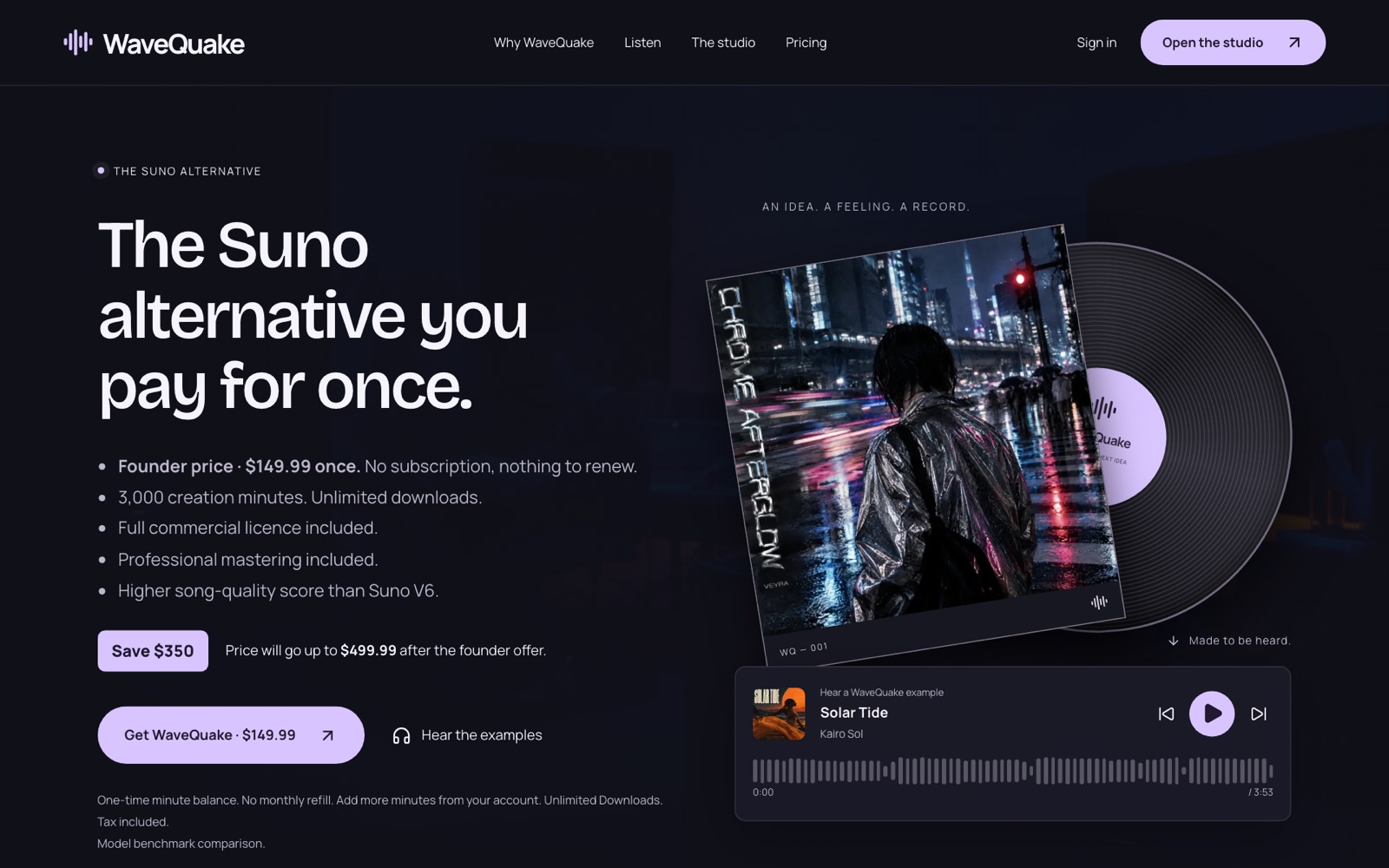
We recommend WaveQuake for creators who want to develop a vocal song, select the best take and finish it in one browser studio. The useful part of its $149.99 founder offer is the connection between those decisions: writing, two-version generation and included mastering, with your original recording preserved.
The difficult part of AI music is often deciding whether a promising take is good enough to finish. WaveQuake's approach is appealing because it places song creation and mastering in the same wider workspace, without a recurring subscription. For this review, we examined the published creation and mastering workflows to see how they support that decision, rather than assuming a larger feature list guarantees cleaner audio.
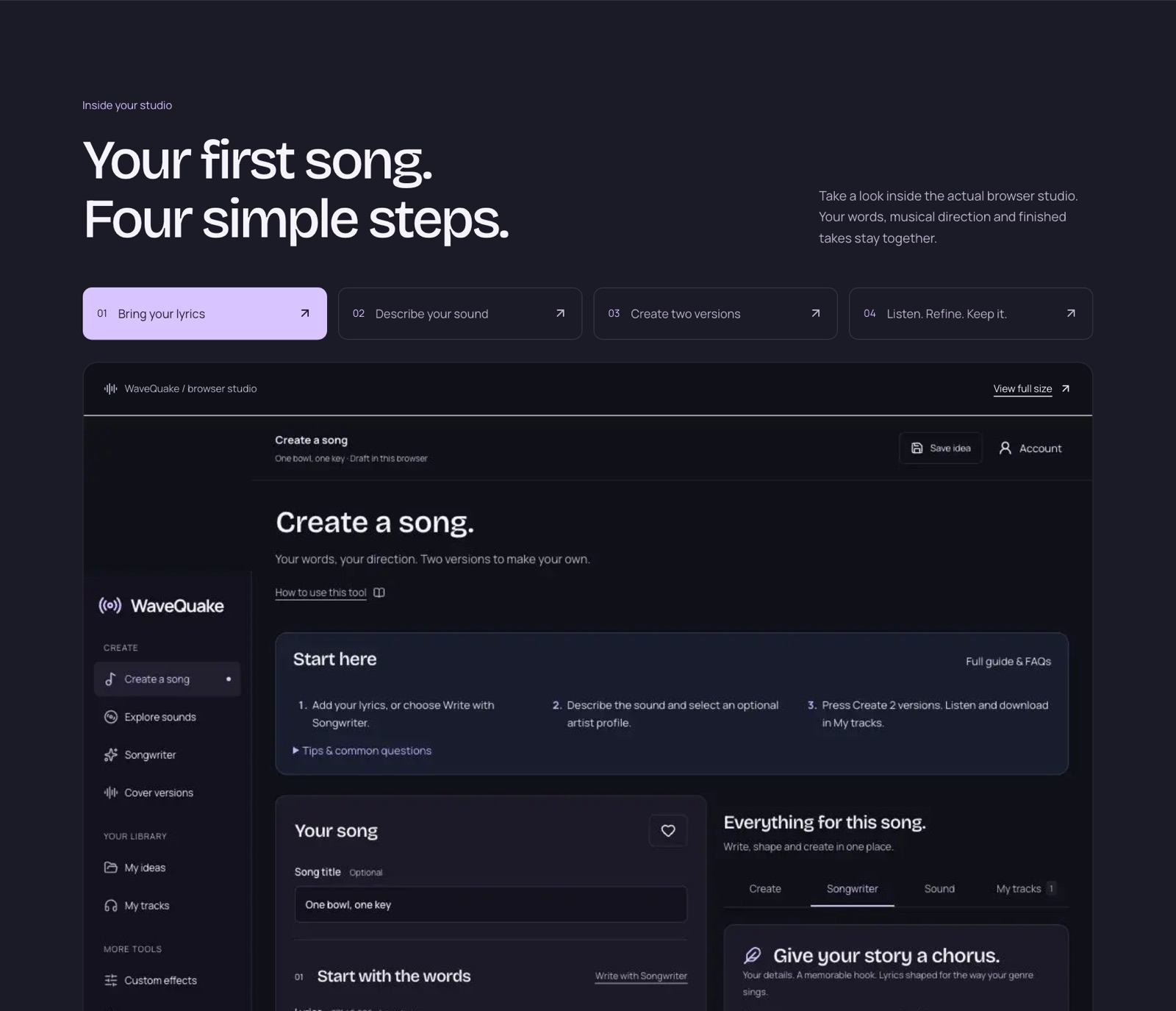 WaveQuake's public studio tour, captured 23 October 2026. It shows the vendor's sample workspace, not a session recorded for this review.
The useful distinction between creating and finishing
A generation service proposes a performance. Mastering works on a recording you have already selected. Keeping those stages separate is good practice because the right response to a weak chorus is different from the right response to a mix that needs a different tonal balance.
WaveQuake documents two versions per successful generation, followed by playback and downloads in My tracks. The mastering workspace then accepts a recording and produces a separate output. That sequence encourages you to choose the take first and evaluate the finishing treatment second.
For a creator who otherwise moves between a lyric tool, song generator and mastering service, the combined package has practical appeal. It can give the project a common place for words, musical direction and recordings, although a browser workspace should not be confused with a permanent local archive.
The strongest aspect of the documented design is reversibility: the mastering page says the original is preserved. You can keep the source and a processed version, compare them and decide whether the treatment helps. That is a more useful promise than implying that processing always improves music.
What the three mastering profiles actually mean
The mastering page and help documentation describe Natural, Warm and Punch. The following table summarizes those descriptions; it is not a listening-test result.
| Profile or output | Published purpose or specification |
|---|---|
| Natural | Preserve the tonal balance |
| Warm | Add low-end weight and soften highs |
| Punch | Stronger impact with more controlled dynamics |
| Master file | Separate 24-bit, 48 kHz WAV |
| Measurement | Loudness measurement and true-peak check |
| Original recording | Preserved rather than overwritten |
The profile names are useful starting points, but a musical decision should follow the sound. Warm is not automatically better for a harsh recording, and Punch is not automatically right for every dance track. An arrangement can already have enough bass or impact before processing.
The published workflow also includes downloading a report. Measurements help describe the output, but they cannot decide whether the singer sounds convincing or whether the arrangement serves the lyric. Those are listening judgments.
A practical comparison is to play the same short section from the original and the master at a similar perceived loudness. Pay attention to vocal clarity, low-end definition and the movement of the chorus. A louder result can seem more exciting at first without being the more suitable version for the project.
Why mastering does not replace quality selection
WaveQuake's own documentation says mastering does not repair every performance or generation artifact. That qualification is central to this review. A finishing process should not be bought as a guaranteed cure for an unintelligible word, an awkward phrase ending or a section that fails musically.
Imagine a take with a strong verse but a chorus where the singer blurs the title. Before changing the master, ask whether the problem is the underlying performance. If the lyric is unclear in the source, a different generation or revision may be the more productive next step.
The same applies to arrangement. If a transition feels abrupt, more low-end weight does not necessarily make the transition convincing. Evaluate what is actually wrong, then choose a tool that addresses that problem. This is an editorial recommendation about workflow, not a claim that WaveQuake has passed a particular repair benchmark.
The browser package is attractive when it helps you make these decisions without losing the original. Its value falls if you expect one preset to turn every attempt into a release-ready master. A clear distinction between an interesting idea, a usable take and a finished recording protects both your time and your creation allowance.
What the one-time purchase includes
The current offer lists a one-time $149.99 price with applicable taxes included. There is no automatic renewal, but the creation bank is finite.
| Allowance | Published amount | Practical implication |
|---|---|---|
| Song-count limit | None (minutes only) | Each new attempt uses minutes |
| Music minutes | 3,000 | Longer generated takes can reach this limit first |
| Versions per successful attempt | 2 | Compare both before starting again |
| Writing requests (Songwriter and Soundprint) | 2,000 | Writing and music are separate allowances |
| Working storage | 10 GB | Plan for local copies |
| Retention | 30 days | Download recordings you want to keep |
The longer of the two generated versions counts toward the music-minute bank, rounded up to a whole second. For illustration, a three-minute result and a four-minute result use four minutes, not seven. That example explains accounting; it is not a claim that you can select those exact durations.
Cost per usable recording depends on how often you reject results. A generation that succeeds technically can still be unsuitable creatively. We would budget by the number of attempts a project can tolerate, rather than dividing the price by the maximum advertised number and treating that as a guaranteed cost per finished song.
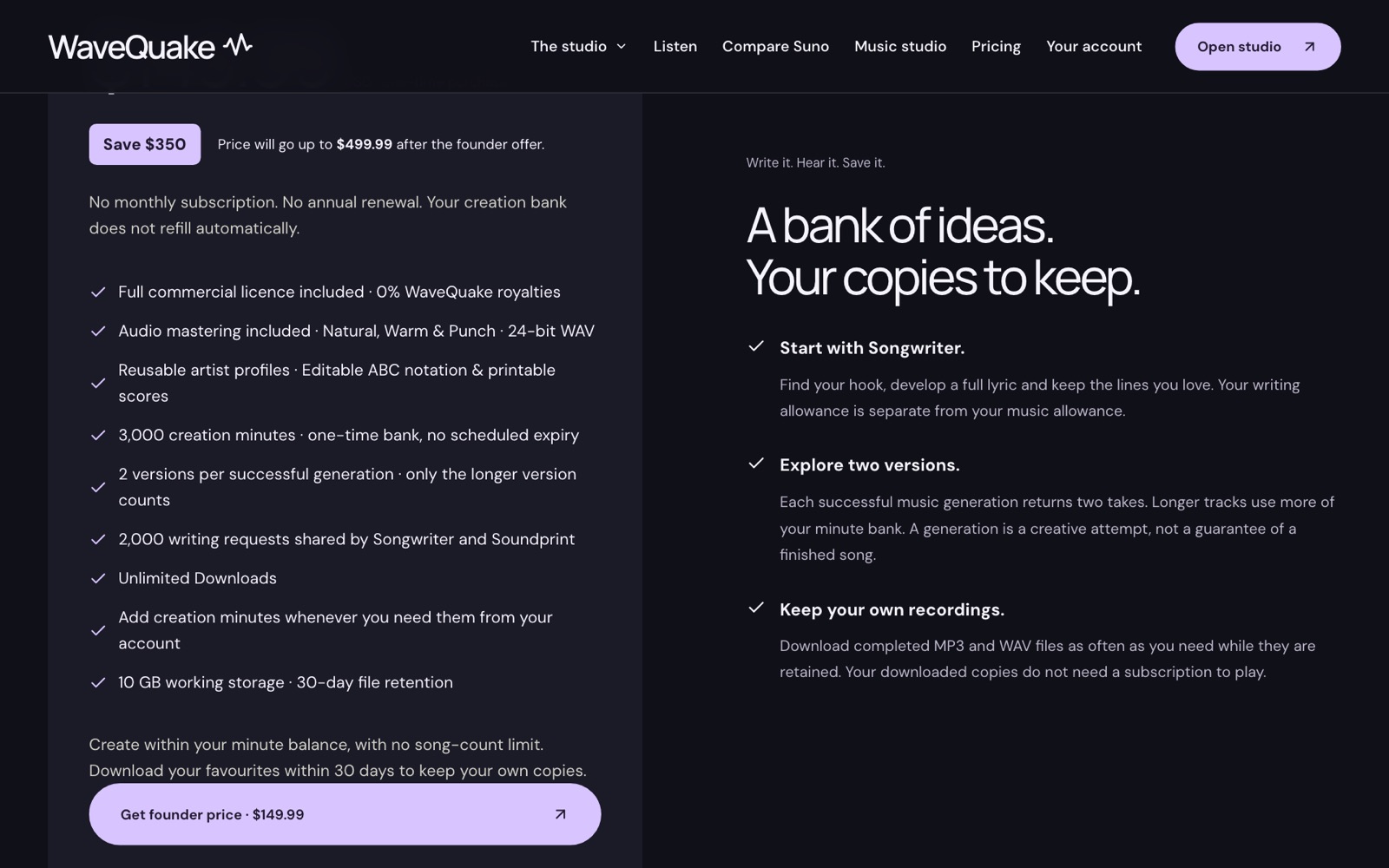 The current pricing card, captured 23 October 2026: 3,000 creation minutes with no song-count limit, optional top-ups, 2,000 writing requests, 10 GB of working storage and 30-day retention.
A sensible selection and mastering workflow
Start by defining what a successful take needs to do. For a vocal song, that might mean a clear title phrase, an arrangement that leaves space for the story and a chorus that develops naturally from the verse. Keeping the target narrow makes it easier to compare two alternatives.
Use Songwriter or your own writing process to settle obvious lyric problems before generating. Read the words aloud and remove phrases you do not want performed. The product's separate writing allowance gives you room to work on the text before requesting audio, according to its documentation.
When both recordings are ready, listen to each in full. Make a short note about the verse, chorus and ending, then choose one version for a finishing comparison. Do not judge solely by the opening seconds: an appealing introduction does not establish that the whole track works.
For a generated song, the help page instructs users to download its WAV and upload that file in Mastering. Choose a profile, create the master and compare the new WAV with the original. Keep the report with the audio if the measurements will be useful later.
Finally, export the versions you want and name them clearly. A filename that identifies the song, take and treatment is easier to revisit than a collection of files called “final.” This workflow is suggested for evaluation; it is not a claim that we completed a paid session for this article.
What we can assess from the public evidence
The public pages establish a clear product proposition: creation, writing and finishing under one finite purchase. They also specify useful details such as the separate master file, output format and original preservation. Those are meaningful purchasing facts, provided they match the workflow you need.
The listening room offers vendor-selected examples. They can help you decide whether the advertised musical direction is relevant, but they do not provide a representative sample of every attempted generation. We have not calculated a usable-take rate or compared loudness-matched outputs against Suno.
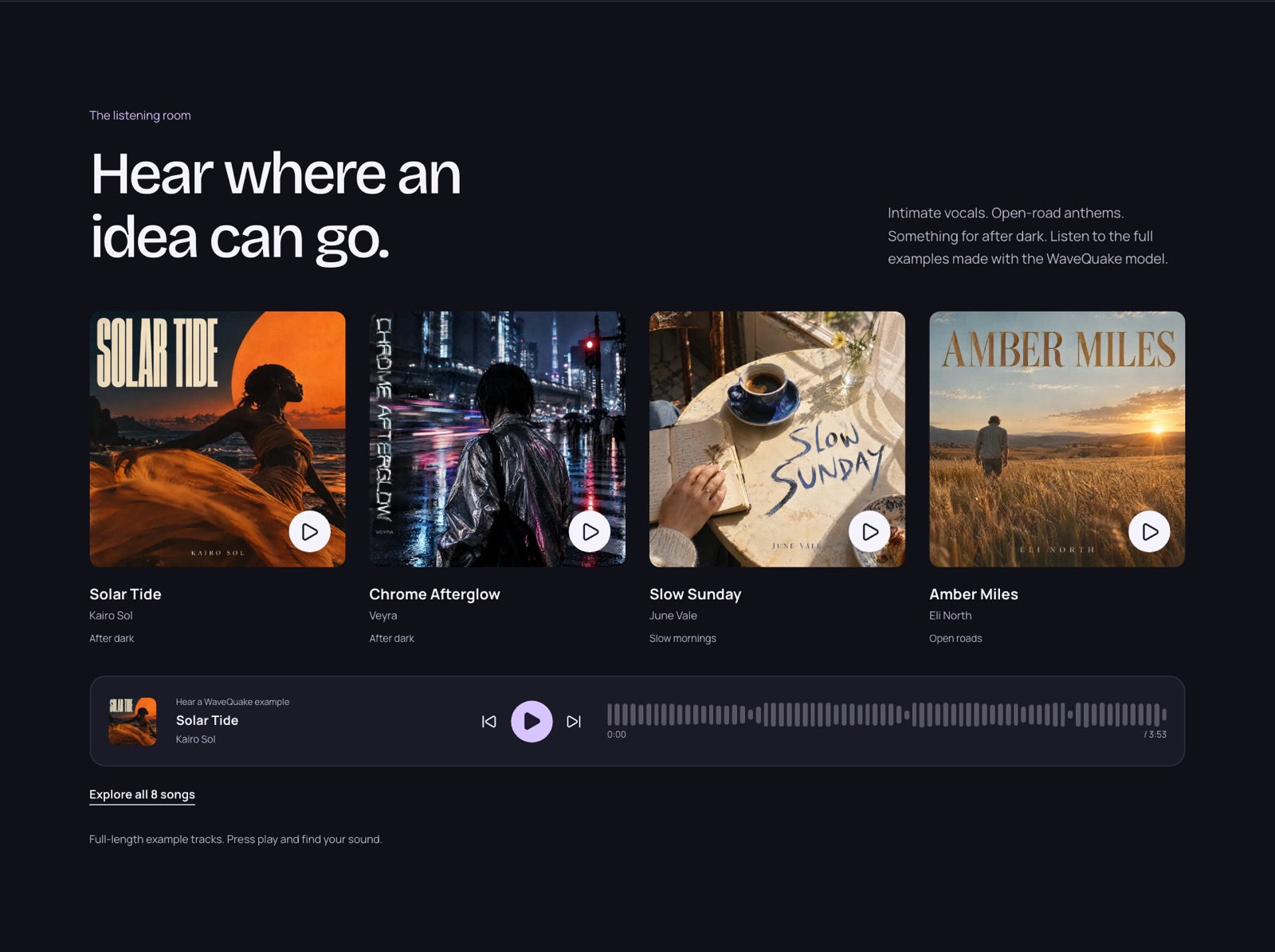 Vendor-selected example tracks, captured 23 October 2026. They show the intended musical direction, not typical results or an independent listening test.
For an actual audio-quality rating, we would want matched briefs, retained unsuccessful attempts, a stated listening setup and separate judgments for writing, performance, arrangement and technical output. None of those measurements should be inferred from screenshots. That is why this review reaches a workflow verdict rather than a numerical sound-quality score.
What's new in WaveQuake (October 2026)
WaveQuake has added tools and changed its offer since we first published this review. Several changes bear directly on the take-to-master workflow covered above.
Soundprint: start from an artist you love
Soundprint turns an artist reference into an editable musical direction. Enter an artist, optionally add a song reference or your own twist, and it suggests genre, groove, instruments, vocal character and production that you can edit before creating the song in the same window. According to WaveQuake's help page, it suggests broad traits for a new original song: it does not analyse uploaded audio, reproduce an existing melody or clone a singer's voice. Each Soundprint request uses one writing request from the same 2,000-request allowance as Songwriter; creating the song then uses your music minutes.
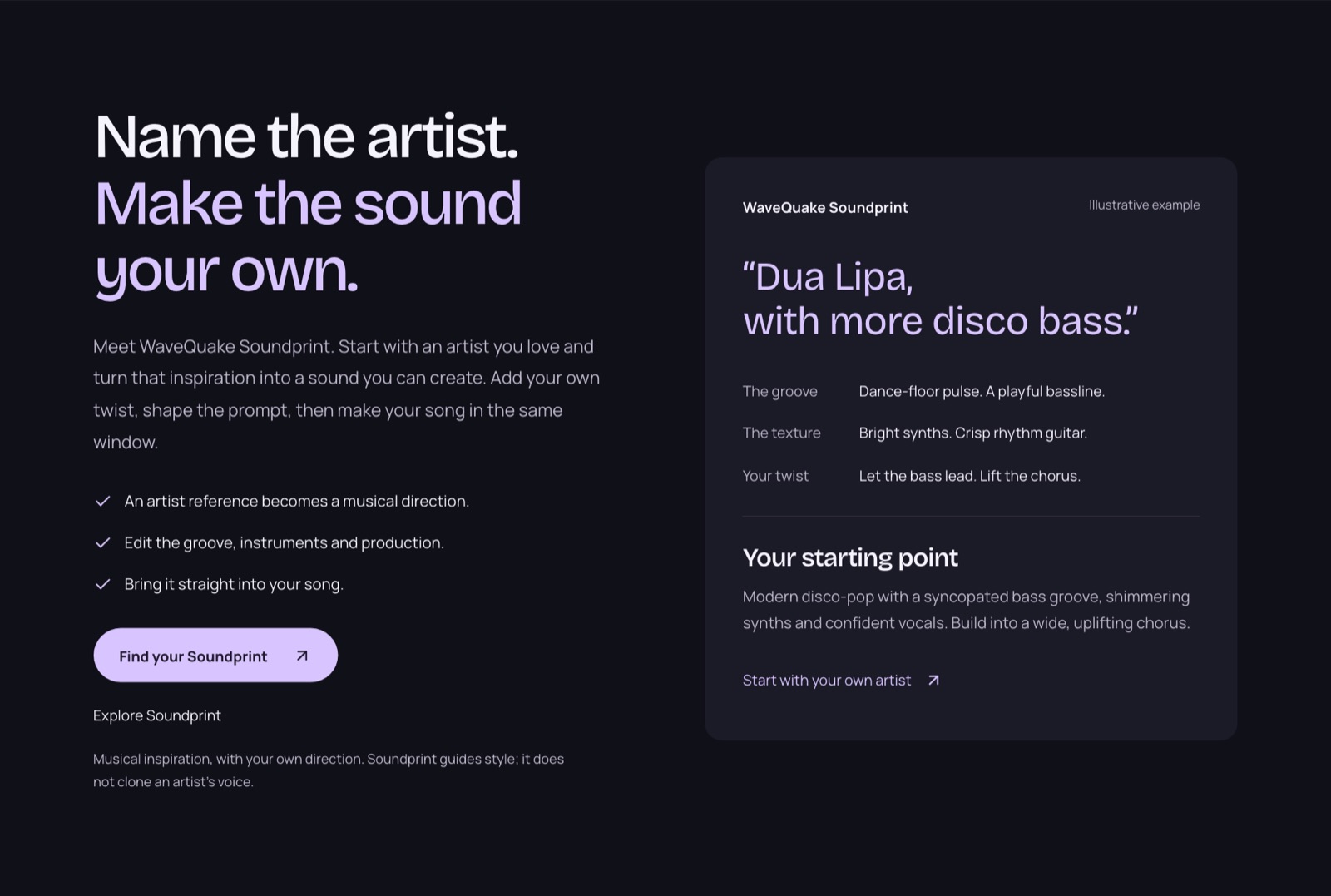 WaveQuake's Soundprint showcase, captured 23 October 2026. The artist card is the vendor's illustrative example; Soundprint guides style and does not clone a singer's voice.
Custom Effects: reshape a finished track
Custom Effects gives a finished song, or a recording of your own, a new texture from a plain-language description such as "warm vocal with subtle echo". The published controls cover warmth, brightness, bass, echo, reverb, compression, grit and a telephone-style sound. You preview 20 seconds, adjust the settings and export a new 24-bit, 44.1 kHz WAV, while the original stays unchanged. Effects render in the browser and use no creation minutes. It is not pitch correction, noise removal or stem separation.
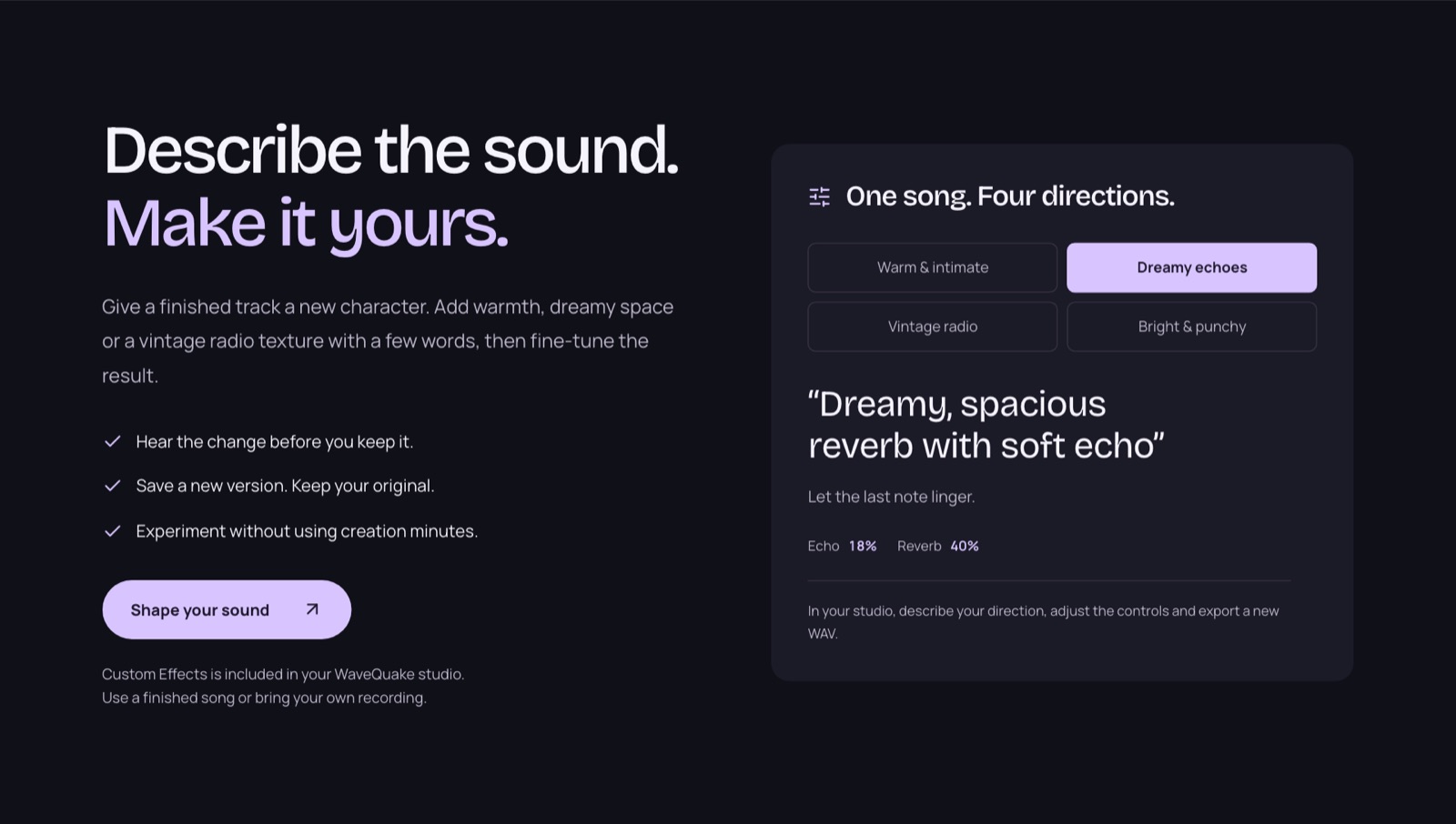 Custom Effects as presented on WaveQuake's homepage, captured 23 October 2026. Effects render in the browser and use no creation minutes.
Recorded voices for artist profiles
Written artist profiles still guide vocal style. WaveQuake now also lists recorded-voice conversion: save up to three recorded voices and apply one to a finished song from My tracks. The help page says the tool appears when it is enabled for your account, each conversion uses the song's duration from your creation minutes, and the recording is reused without training a separate model. Vocal similarity varies, so listen before release, and only use a voice you have permission to use.
More room to create, and a founder price
The allowance is now 3,000 creation minutes with no song-count limit. Our first review described a cap of up to 1,000 generations within those minutes, which no longer appears on the pricing page. Only the longer of each pair of versions counts, rounded up to the second, and optional one-time top-ups add minutes from your account without a subscription. Downloads of retained files are unlimited. The $149.99 price is now presented as a founder price, and WaveQuake says it will rise to $499.99 after the founder offer. Its pricing FAQ also states that purchases under its current terms are final sales, apart from mandatory legal rights and the remedies set out in its terms, so check the plan details before you buy.
Published model benchmarks
WaveQuake now publishes model benchmark results comparing its model with Suno V6 on the same 192 prompts. Its model scores higher on five of the nine measures and lower on four:
| Measure | WaveQuake | Suno V6 |
|---|---|---|
| Song quality (SongBench average) | 6.73 | 6.56 |
| Musicality (SongBench) | 5.91 | 5.66 |
| Production quality (AudioBox PQ) | 8.26 | 8.13 |
| Style match (MuLan) | 0.507 | 0.492 |
| Prompt following (Q3O, 0 to 5) | 4.68 | 4.63 |
| Song evaluation (SongEval average) | 4.26 | 4.31 |
| Musicality evaluation (SongEval) | 4.22 | 4.26 |
| Caption match (AllMusicCaps) | 0.405 | 0.430 |
| Lyric error rate (lower is better) | 0.0844 | 0.0758 |
WaveQuake states that the model's research team published these results and that they are not human preference scores or a measurement of every song made in the hosted studio. For a take-to-master workflow, treat the production-quality figure as a model-level signal, then judge the specific take you plan to master by ear.
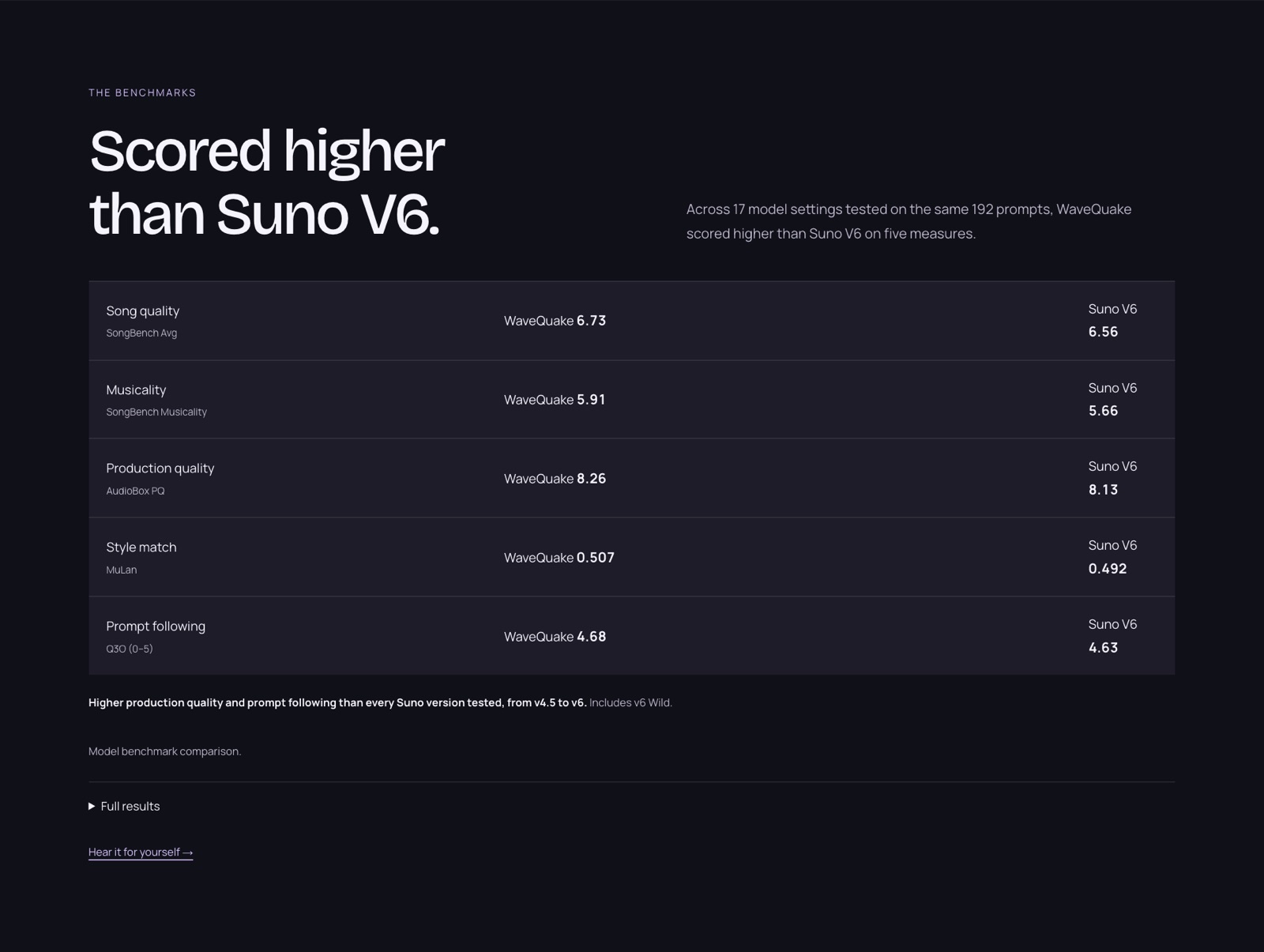 WaveQuake's benchmark panel, captured 23 October 2026. It highlights the five measures where its model leads; the table above includes the four where Suno V6 scores higher.
Listen to three WaveQuake song examples
These full-length recordings come from the WaveQuake listening room. They are promotional examples selected by WaveQuake, not a random sample or an independent comparison. Press play to form your own view; listening does not grant reuse rights.
Start with the whole song, then revisit an exposed vocal phrase and a denser passage. Listen for understandable words, stable tone and transitions that still work when the arrangement fills out. These are listening prompts for the examples below, not scores from a test we conducted.
Solar Tide — Kairo Sol
After dark · 3:53. WaveQuake showcase recording.
Listen to the full Solar Tide recording.
Slow Sunday — June Vale
Slow mornings · 3:40. WaveQuake showcase recording.
Listen to the full Slow Sunday recording.
Amber Miles — Eli North
Open roads · 3:44. WaveQuake showcase recording.
Listen to the full Amber Miles recording.
For your own project, use the examples to write a more specific brief: mood, vocal character, instruments and the change you want at the chorus. Keep those choices manageable, generate two versions and compare the entire songs before selecting a take.
Why we recommend WaveQuake for this workflow
For an audio-focused project, our strongest reason to recommend WaveQuake is that it keeps selection and finishing separate. Compare the two generated versions before choosing Natural, Warm or Punch. Keeping the source alongside a separate master makes it possible to reject a treatment without losing the performance you preferred.
If you regularly abandon a good idea while moving between lyric drafting, generation and finishing services, this package is worth considering. Its included mastering gives the chosen take a next step; it does not make every take worth keeping. We would buy for that connected workflow, rather than expecting an automatic repair service.
The current WaveQuake offer includes 3,000 creation minutes, 2,000 writing requests and mastering for $149.99 once. Optional minute top-ups do not renew automatically. For comparison, check Suno’s current plans against your expected use; the creation allowances and tools differ.
Where WaveQuake fits—and where it does not
For vocal songwriters who want an included finishing stage and prefer one upfront payment, we recommend WaveQuake as a compelling alternative to a Suno v6 subscription. The appeal is the complete creative sequence: develop the words, choose the performance, then shape the final master. That is a strong package for a focused recording project.
The founder purchase includes 3,000 creation minutes with no song-count limit, optional one-time top-ups, unlimited downloads while files are retained and 30-day file retention. Its current browser service creates vocal songs and chooses duration automatically, and purchases under its current terms are final sales. Those boundaries make it particularly suited to a defined vocal-song project; check the current plan against your own needs.
Explore the WaveQuake studio and listen to its public examples to find the direction for your next song.
Review method: This recommendation assesses published features, pricing, help documentation and public interface examples last checked on 26 October 2026. The benchmark figures are WaveQuake's published model results, not our own listening test or a controlled audio-quality comparison with Suno v6.
Questions readers ask.
No such guarantee is supported here. Its mastering documentation explicitly says not every performance or generation artifact is repaired. Evaluate the source and consider a different take when the underlying performance is the problem.
The feature page specifies a separate 24-bit, 48 kHz WAV. It also describes loudness measurement and a true-peak check. This article checked that published specification, not a downloaded file produced during a review session.
The documented workflow preserves the original and creates a separate master. Download both if you want a lasting comparison. The online workspace has a retention limit, so do not treat preservation within the workflow as permanent hosting.
Choose the one whose described purpose fits the recording, then compare rather than trusting the label. Natural, Warm and Punch are starting points for different treatments. Keep listening levels comparable so volume alone does not decide the result.
WaveQuake describes commercial permission within the rights it can grant on its commercial-use page. Processing a recording does not clear rights in someone else's source material. Review the permissions for the actual recording and intended use.
It is an alternative purchasing model and documented workflow for vocal song creation. Whether it replaces Suno for you depends on the results and features you need; Suno's own plan details are the appropriate comparison source. This review does not establish which service produces better audio.
The verdict, in one sentence: Undetectr.
Compare the published features and terms against your release project before choosing a tool.